Model selection and transcoding
This sandbox runs Envoy as an AI gateway: clients speak one API, OpenAI Chat Completions, to one endpoint, and
Envoy routes each request on its model, sending it to that model’s provider in the provider’s own API.
The providers are local mocks, one for each provider API: OpenAI Chat Completions, Anthropic Messages and Gemini GenerateContent. Each answers with its own canned reply, as unary JSON or a stream of server-sent events, so the sandbox needs no account or API key, and its output is deterministic.
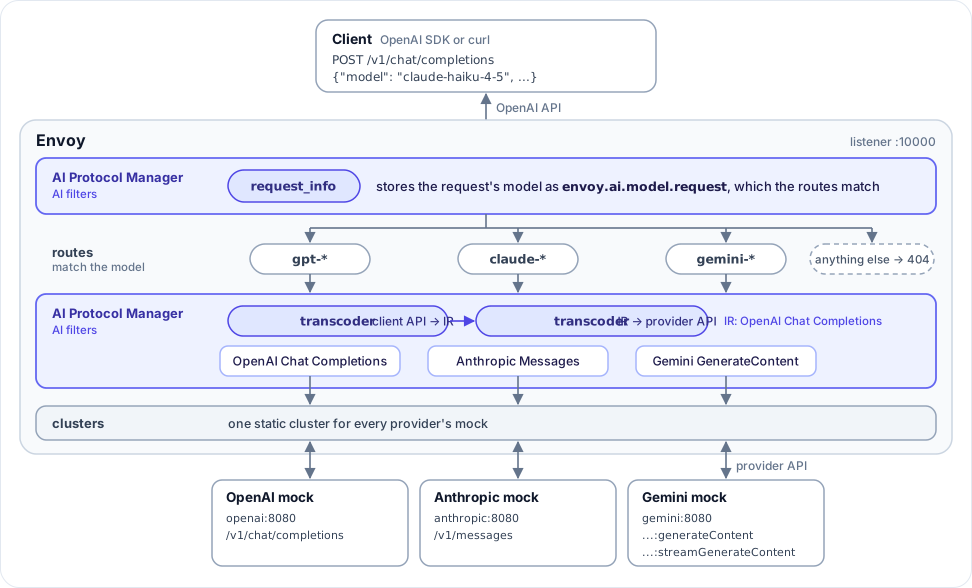
For each request, Envoy:
reads the request’s
modelwith the AI Protocol Manager, whose request info AI filter stores it as theenvoy.ai.model.requestfilter state object, and picks a route on it:gpt-*models go to the OpenAI mock,claude-*models to the Anthropic mock, andgemini-*models to the Gemini mock. Any other model is answered by Envoy with a404.converts the request into the provider’s API, and the provider’s response (a JSON body or a stream of server-sent events) back into OpenAI’s, with the AI Protocol Manager’s transcoder AI filter.
Warning
The AI Protocol Manager and its transcoder are alpha, and their APIs are a work in progress: Envoy logs warnings about them at startup.
Step 1: Start the sandbox
Change to the ai-transcoder directory, and build and start the proxy and the three mocks.
$ pwd
examples/ai-transcoder
$ docker compose pull
$ docker compose up --build -d
$ docker compose ps
NAME                        IMAGE                     COMMAND                  SERVICE     CREATED          STATUS                    PORTS
ai-transcoder-anthropic-1   ai-transcoder-anthropic   "python3 /code/servi…"   anthropic   10 seconds ago   Up 9 seconds (healthy)
ai-transcoder-gemini-1      ai-transcoder-gemini      "python3 /code/servi…"   gemini      10 seconds ago   Up 9 seconds (healthy)
ai-transcoder-openai-1      ai-transcoder-openai      "python3 /code/servi…"   openai      10 seconds ago   Up 9 seconds (healthy)
ai-transcoder-proxy-1       ai-transcoder-proxy       "/docker-entrypoint.…"   proxy       10 seconds ago   Up 4 seconds (healthy)    0.0.0.0:9901->9901/tcp, 0.0.0.0:10000->10000/tcp
Envoy listens for OpenAI chat requests on port 10000, and serves its admin interface on port 9901.
Step 2: Chat with a Claude model
Send an OpenAI chat completion request to Envoy, asking for a Claude model:
$ curl -s http://localhost:10000/v1/chat/completions \
    -H 'content-type: application/json' \
    -d '{"model": "claude-haiku-4-5", "messages": [{"role": "user", "content": "In one short sentence, what is Envoy proxy?"}]}' \
    | jq '.object, .model, .choices[0].message'
"chat.completion"
"claude-haiku-4-5"
{
  "content": "Envoy is an open-source, high-performance proxy for cloud-native applications.",
  "role": "assistant"
}
The Anthropic mock answered, but the reply is an OpenAI chat.completion: Envoy converted the request into
Anthropic’s Messages API, and the mock’s answer back, including the stop reason and the token usage.
Step 3: Send the same request to each provider
Only the model changes between providers - each mock’s canned reply shows who answered:
$ for model in gpt-4o-mini claude-haiku-4-5 gemini-2.5-flash; do
    curl -s http://localhost:10000/v1/chat/completions \
      -H 'content-type: application/json' \
      -d "{\"model\": \"${model}\", \"messages\": [{\"role\": \"user\", \"content\": \"In one short sentence, what is Envoy proxy?\"}]}" \
      | jq -r '"\(.model): \(.choices[0].message.content)"'
  done
gpt-4o-mini: Envoy is an open-source edge and service proxy designed for cloud-native applications.
claude-haiku-4-5: Envoy is an open-source, high-performance proxy for cloud-native applications.
gemini-2.5-flash: Envoy is a high-performance, open-source edge and service proxy for cloud-native applications.
Step 4: Stream a response
Ask for a stream from a Gemini model. The mock streams its reply as Gemini server-sent events, and Envoy converts
each one into an OpenAI chat.completion.chunk, whose deltas assemble the reply:
$ curl -sN http://localhost:10000/v1/chat/completions \
    -H 'content-type: application/json' \
    -d '{"model": "gemini-2.5-flash", "stream": true, "messages": [{"role": "user", "content": "In one short sentence, what is Envoy proxy?"}]}' \
    | sed -n 's/^data: //p' | grep -vx '\[DONE\]' | jq -c '.choices[0].delta'
{"content":"Envoy is a high-performance, open-source edge and service proxy","role":"assistant"}
{"content":" for cloud-native applications.","role":"assistant"}
Gemini’s streams just end, so Envoy also added the data: [DONE] event that OpenAI clients wait for.
Anthropic’s named events, from message_start to message_stop, are converted the same way.
Step 5: See where each request went
Envoy’s access log shows each request’s model, and the cluster and path it was sent to:
$ docker compose logs proxy | grep -- ' -> '
proxy-1  | claude-haiku-4-5 -> anthropic /v1/messages 200 via_upstream
proxy-1  | gpt-4o-mini -> openai /v1/chat/completions 200 via_upstream
proxy-1  | claude-haiku-4-5 -> anthropic /v1/messages 200 via_upstream
proxy-1  | gemini-2.5-flash -> gemini /v1beta/models/gemini-2.5-flash:generateContent 200 via_upstream
proxy-1  | gemini-2.5-flash -> gemini /v1beta/models/gemini-2.5-flash:streamGenerateContent?alt=sse 200 via_upstream
The log reads the model from the envoy.ai.model.request filter state object, with
%FILTER_STATE(envoy.ai.model.request:PLAIN)%.
Every client sent its request to /v1/chat/completions: the Anthropic route rewrote the path to
/v1/messages, and the transcoder moved the Gemini requests’ model, and whether to stream, into the Gemini
API’s path.
Step 6: Ask for a model that no provider serves
A model that no route matches never leaves Envoy. It is answered with a 404, in OpenAI’s error format so that
OpenAI clients can read it:
$ curl -s http://localhost:10000/v1/chat/completions \
    -H 'content-type: application/json' \
    -d '{"model": "llama-3.1-8b", "messages": [{"role": "user", "content": "Hi"}]}' \
    | jq
{
  "error": {
    "message": "No backend serves this model.",
    "type": "invalid_request_error",
    "param": "model",
    "code": "model_not_found"
  }
}
Step 7: Check the transcoder’s statistics
The AI Protocol Manager counts every payload the transcoder converted - each request, JSON response and streamed event - and the ones it could not:
$ curl -s "http://localhost:9901/stats?filter=ai_protocol_manager.transcoder"
ai_protocol_manager.transcoder.failed: 0
ai_protocol_manager.transcoder.transcoded: 23
ai_protocol_manager.transcoder.unresolved: 0
See also
- AI Protocol Manager
Learn more about the AI Protocol Manager filter and its AI filters.
- Transcoder API
The transcoder AI filter’s configuration.
- Well known filter state
Learn more about the
envoy.ai.model.requestfilter state object.